AI in Software Development 2026: SDLC Impact, Real Productivity Data & What's Next
5/1/2026
By: Devessence Inc

Software has always been slow to build. You write code, test it, fix it, and repeat that cycle for weeks or months before anything ships. AI is starting to change that — but not in the way most headlines suggest.
Some stages of software development have been genuinely transformed. Others are barely touched. And some of the research findings are genuinely surprising, like the study showing that experienced developers actually get slower when they use AI tools.
This guide walks through what's changing at each stage of the SDLC, what the data actually says about productivity, and what teams should be thinking about before the next wave hits.
Key Takeaways
- Adoption is nearly universal. 97% of organizations are using or evaluating AI in software development. The 3% who aren't are now the outliers.
- Coding benefits most. Planning, design, and maintenance still require human judgment AI can't replicate.
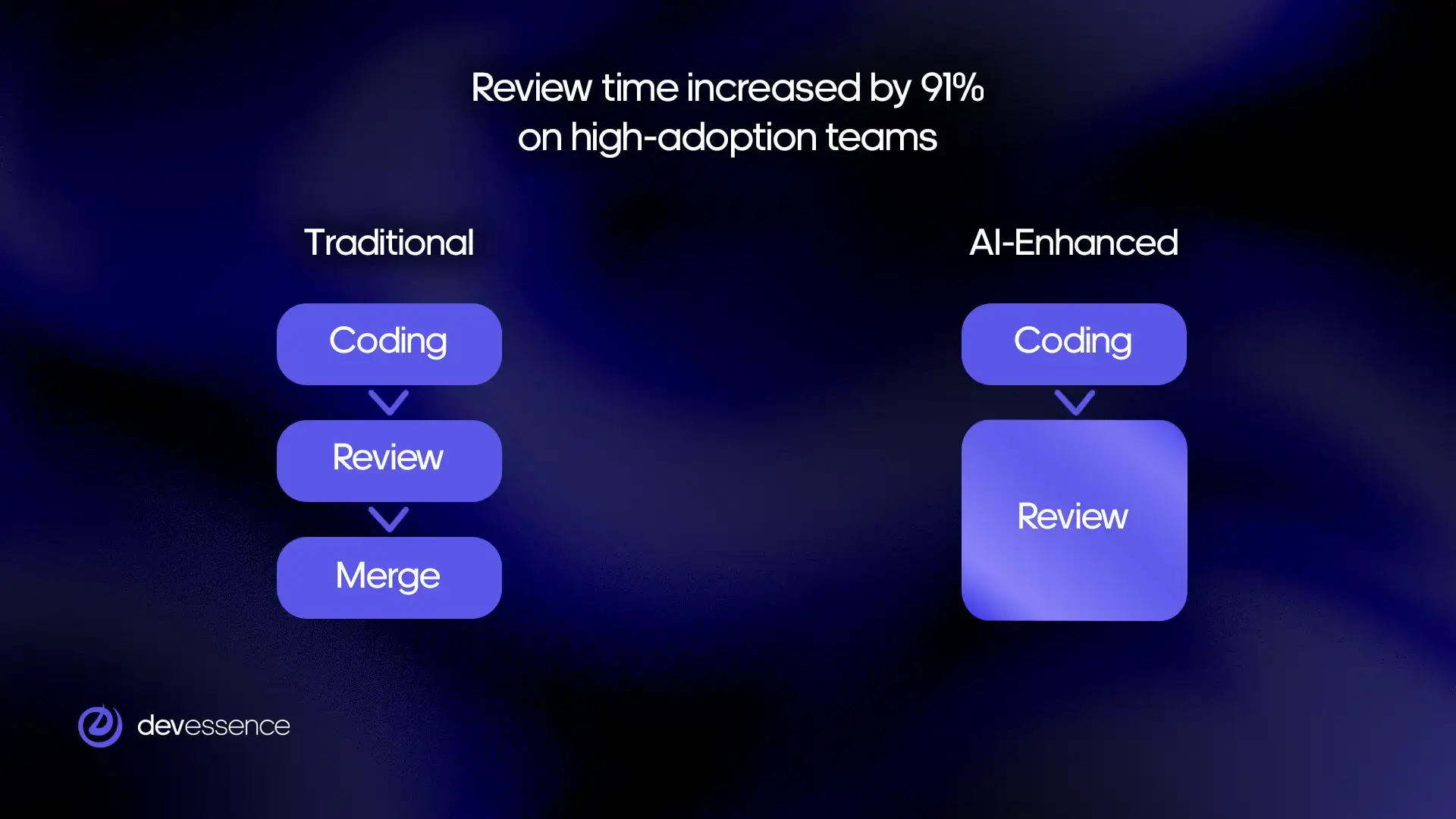
- AI speeds up coding but overwhelms review pipelines. Faros AI found review time rose 91% on high-adoption teams.
- More code means more pull requests. If review doesn't scale, throughput stays flat.
- 46% of developers distrust AI output. 66% cite "almost right but not quite" as their biggest frustration.
- Gartner projects 60% of enterprise AI rollouts will include agentic capabilities by end of 2026.
- 50% of governments are expected to enforce AI-in-software rules by 2026. Governance frameworks can't wait.
Some Stats
AI adoption in software development has moved fast. A few years ago, using AI tools was something individual developers experimented with on side projects. Now it's built into the main workflow at most companies.
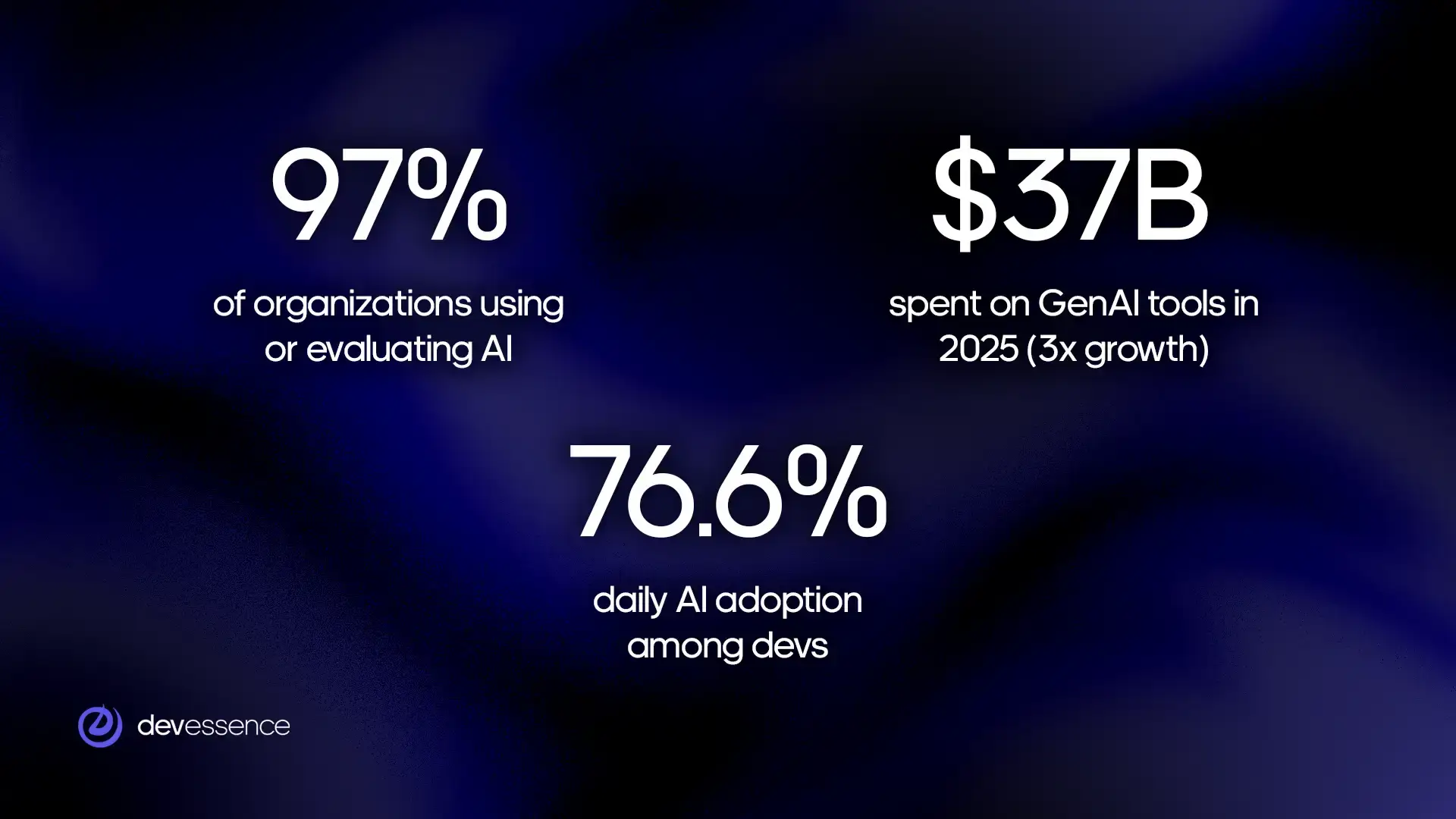
The numbers tell the story:
- 97% of software organizations are using or actively evaluating AI tools
- 6% are already using AI in their day-to-day development work
- $37B was spent on generative AI tools in 2025, up 3× from the year before
- 1% of organizations are not using AI and have no plans to
The most common uses are writing code, generating documentation, and reviewing code for problems. Testing and deployment automation are growing fast, too.
What Is the SDLC and Why Does It Matter?
Every piece of software — a mobile app, a web platform, an internal business tool — goes through roughly the same journey before it reaches users. That journey has a name: the Software Development Lifecycle, or SDLC. It describes the full sequence of steps a team takes to plan, build, test, release, and maintain software.
The reason the SDLC matters for this conversation is simple. AI is landing differently at each stage, useful in some places, limited in others, and largely absent in a few. Understanding the stages helps you understand where the real changes are happening and where the hype outpaces the reality.
Here's an overview of each stage:
- Planning: deciding what to build, why, and in what order.
- Design and architecture: mapping out how the system will be structured before anyone writes a line of code.
- Coding: the actual work of writing software.
- Testing: checking that the software works correctly and doesn't break under pressure.
- Deployment: releasing the software so users can access it.
- Maintenance: keeping the software running, fixing bugs, and updating it as needs change.
Most software teams cycle through these stages repeatedly. A feature gets planned, built, tested, released, and then maintained while the next feature is already being planned. It's less a straight line than a continuous loop.
What AI Is Actually Used For in the SDLC
Software development isn't a single task. It's a chain of stages called the Software Development Lifecycle, or SDLC. AI is landing differently at each stage, being useful in some and limited in others.
How does AI help with software planning?
AI helps with the groundwork: scanning backlogs, flagging vague user stories, generating first-draft requirements, and predicting how long features might take based on historical data.
What it can't do is tell you whether your product direction is right. It can't weigh business risk against engineering cost or read the room in a stakeholder meeting. Planning is about making bets under uncertainty, and that still requires human judgment.
How does AI assist with software design and architecture?
Good architecture is expensive to get wrong. A bad decision on day one can cost months of rework later.
AI is useful here because it's seen a lot of code. It can spot antipatterns, suggest proven solutions to common problems, and flag designs that might create tight coupling. It can scaffold component structures and generate diagrams quickly.
What it can't do is understand your specific constraints: your team's skill set, your infrastructure debt, your regulatory environment, or the undocumented systems your new service needs to talk to.
What is AI's impact on software coding and development?
This is where AI has had the most visible impact. Tools like GitHub Copilot, Cursor, and Claude Code complete code as you type. Copilot surfaces suggestions on roughly 46% of keystrokes; developers accept about 30% of them.
For mechanical work like boilerplate, scaffolding, database migrations, and REST endpoints, AI is genuinely excellent. Developers report saving 30 to 60% of their time on this category of task.
The key distinction: AI automates the parts of coding that require recall, not reasoning. Designing a clean abstraction, debugging a race condition, deciding how a module should evolve – those still need a developer who understands the problem deeply.
Does AI improve software testing?
AI can write unit tests up to 50% faster and generate edge cases a developer might not have considered. For teams that have historically under-tested, this is a real unlock.
The problem is downstream. More code and more tests mean more pull requests. Faros AI found that high-adoption teams merged 98% more pull requests, but review time increased by 91%. The testing stage accelerates; the review stage becomes the new chokepoint.
There's a quality issue, too. AI-generated tests tend to confirm what the code does, not what it should do. If the underlying logic is wrong, AI will often write a test that validates the wrong behavior. Meaningful coverage still requires a human who understands the intent of the feature.
How is AI changing software deployment and DevOps?
CI/CD pipelines have been partially automated for years. AI is pushing further: monitoring builds, flagging anomalous patterns, suggesting rollback decisions, and handling routine release coordination.
Agentic AI is making this more ambitious. These systems don't just observe a pipeline — they act inside it, triggering steps, responding to failures, and escalating intelligently. Gartner projects 60% of enterprise AI rollouts will include agentic capabilities by the end of 2026.
What hasn't changed is accountability. When a deployment goes wrong, a human needs to own that decision. AI can accelerate the process; it can't absorb the responsibility.
What role does AI play in software maintenance?
Maintenance is the unglamorous part of the SDLC, like error logs, legacy bugs, keeping systems running while the business keeps changing. It accounts for 60 to 80% of total engineering effort over a product's lifetime.
AI is making early inroads. Log summarization tools turn walls of error output into readable narratives. Bug localization tools point to failure sources faster than manual investigation. Some systems now flag code with the statistical signature of future incidents (high churn, low test coverage, frequent recent changes, etc.).
Not sure where your team stands on any of this? We work with engineering teams at every stage of AI adoption.
Get in touchCost and ROI: What to Expect Before You Invest
AI tools for software development range from free to significant enterprise contracts. The cost side is relatively straightforward, but the return side is harder, and thinking about it honestly upfront saves a lot of disappointment six months in.
What AI tools actually cost
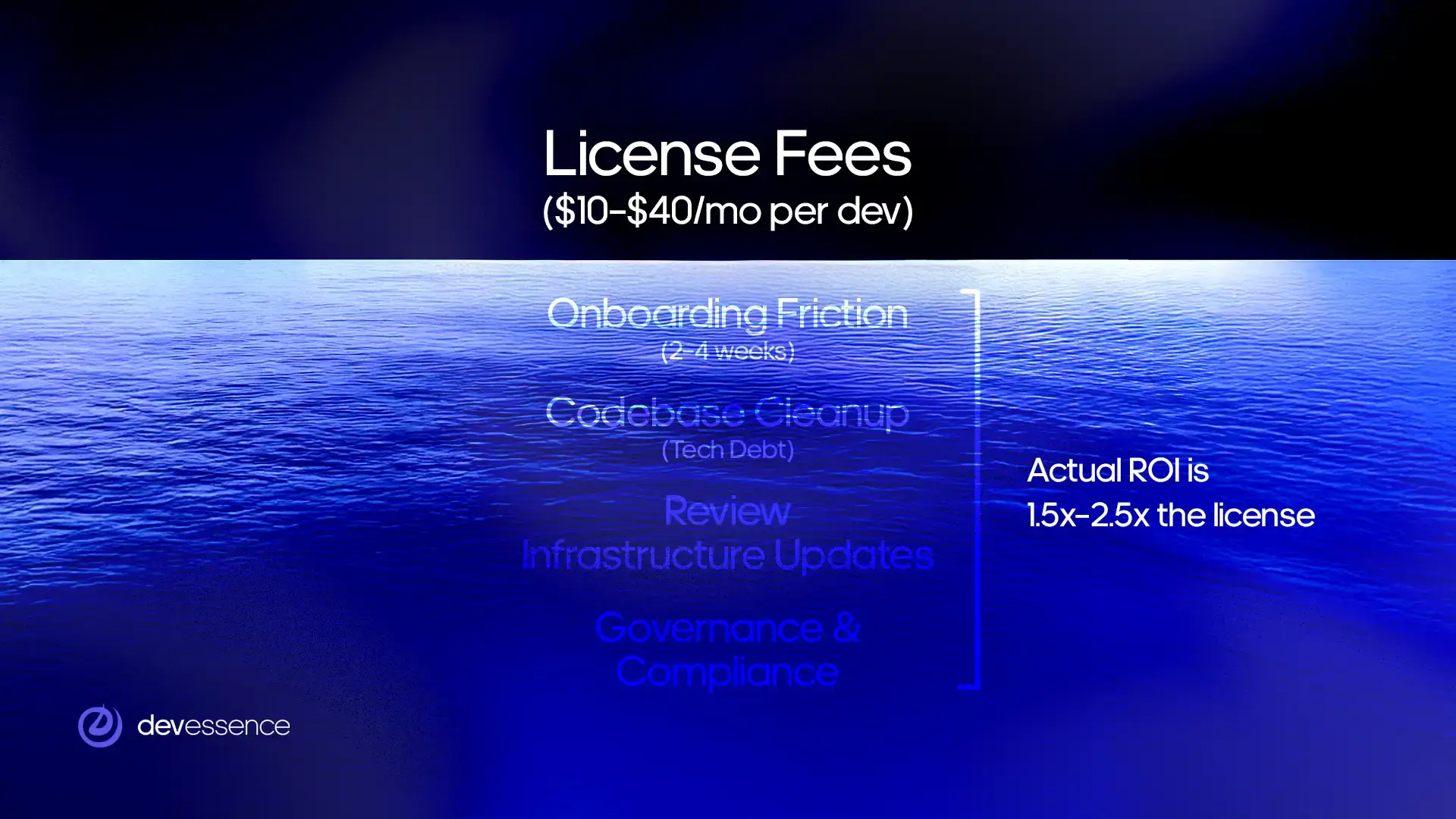
Most AI coding tools are priced per developer per month. Code completion tools like GitHub Copilot sit at the lower end, typically $10 to $40 per developer. AI-native editors like Cursor run $15 to $40. Agentic coding tools like Claude Code, Devin can range from $20 to $500 or more, depending on usage. Testing automation and observability tools add another $30 to $200 per developer on top.
For a 10-person team running a basic stack of code completion and AI-assisted testing, expect to spend $500 to $1,500 per month. Larger teams with enterprise contracts and broader tooling regularly spend $5,000 to $20,000 per month.
Those numbers matter because they set the baseline for what your team needs to recover in productivity gains just to break even.
The hidden costs most teams miss
License fees are the visible part. The costs that tend to surprise teams are the ones that don't appear on an invoice.
- Onboarding friction. Expect two to four weeks of reduced productivity per developer as they adjust their workflow and learn to use AI tools effectively. For a 10-person team, that's real capacity lost upfront before any gains appear.
- Codebase preparation. AI tools perform significantly better on clean, well-structured codebases. Teams carrying technical debt often need to invest in cleanup before AI assistance becomes reliable.
- Review infrastructure. AI increases code volume, which increases review load. Teams that don't update their review processes end up with the bottleneck problem described earlier in this article.
- Governance and compliance. Understanding what data your AI tools can access, meeting your industry's regulatory requirements, and keeping up with fast-changing legal frameworks around AI-generated code all take time and sometimes specialist advice.
A realistic total cost of AI adoption (licenses, onboarding friction, codebase work, and governance) is typically 1.5 to 2.5 times the headline license cost in the first year.
When do returns appear?
It depends heavily on where you start.
Teams with clean codebases and well-defined workflows tend to see measurable gains within four to eight weeks. Code completion reduces time on boilerplate quickly. AI-assisted test generation speeds up coverage on new features. Documentation tools save time almost immediately on a task most developers avoid.
Teams with significant technical debt or unclear workflows often see flat or negative returns in the first two to three months. AI amplifies existing confusion rather than reducing it. For these teams, preparation has to come before adoption, and returns follow the preparation, not the tool purchase.
Enterprise teams rolling out AI at scale typically model 18 to 24 months to full positive ROI, accounting for rollout complexity, training, governance, and the time required to update pipelines across multiple teams.
Three numbers to establish before you spend anything
Time spent on mechanical work. How much of your team's week goes on tasks that feel repetitive – boilerplate, test scaffolding, documentation, routine debugging? This is the category AI is most likely to improve. If it's less than 20% of total time, the ceiling on AI's impact is lower than most vendors suggest.
Review and testing pipeline speed. How long does a pull request sit before review? How long does a test suite take to run? If these numbers are already high, AI will make them worse before it makes them better. Know your baseline before adding volume.
Delivery frequency. How often does your team ship? This is the metric that matters at the business level. If AI adoption doesn't eventually move this number, the productivity gains will stay inside the development process and not reach users.
How to Measure AI Productivity Gains
Here are four metrics worth tracking before and after AI adoption.
Cycle time
How long does it take a piece of work to move from started to shipped?
Break it down by stage – time in development, time in review, and time in testing. This breakdown matters because AI typically compresses the development stage while expanding the review stage. Without it, a flat overall cycle time looks like AI had no effect. With it, you can see exactly where the bottleneck moved.
Cycle time should decrease over three to six months if the workflow has been properly adapted. If development time drops but review time rises by the same amount, the pipeline needs attention before gains can compound.
Code review throughput
How much reviewed and merged code is your team producing each week relative to what's waiting in the queue?
When AI increases code volume without a corresponding increase in review capacity, the queue grows. A growing queue means more context-switching, longer waits for feedback, and developers losing the flow that makes AI useful. If the queue is growing faster than it's being cleared, invest in review capacity before expanding AI usage further.
Defect rate
How many bugs reach production per release cycle?
This is the most direct indicator of whether AI is helping or hurting code quality and the metric most teams forget to baseline before adopting AI. AI-generated code can look correct without being correct. If the defect rate rises after AI adoption, the review discipline hasn't kept pace with output volume.
The defect rate should hold steady or decrease. A rising defect rate after introducing AI tools means acceptance of suggestions is outpacing careful review.
Time spent on high-value work
Is AI freeing developers to do more work that requires human judgment, or just generating more volume of the same mechanical tasks?
Track a rough weekly split between mechanical tasks (boilerplate, routine fixes, documentation) and higher-judgment tasks (design decisions, complex debugging, architecture). Run this for two weeks before AI adoption, then again at 60 and 120 days after. If the split isn't shifting toward higher-judgment work, the workflow hasn't adapted enough.
How to use these four metrics
Measure all four before adopting AI tools, then check again at 60 and 120 days. That window is long enough to see past initial enthusiasm and short enough to course-correct before problems compound.
Not sure what your current baselines look like or where to start measuring? We help engineering teams set up the right metrics before AI adoption, so the results are readable
Get in touchWho Benefits Most from AI in Software Development?
Experience level, team structure, and company size all shape whether AI becomes a genuine productivity boost or just another tool that never quite delivers.
Junior developers: real gains, with one important warning
For developers early in their careers, AI closes gaps that used to take months to fill.
Syntax error you don't recognize? AI explains it. Library you've never touched? AI shows a working example. A function you're not sure how to structure? AI gives you a starting point. The feedback loop that used to mean waiting hours for a senior review now takes minutes.
Junior developers who previously avoided unfamiliar tasks are tackling them, shipping more, learning faster, and building pattern recognition that used to take years. Yet, developers who rely on AI too early risk skipping the struggle that builds real debugging instincts.
If AI always fills the gap, the gap never closes. The most effective junior developers use AI the way a good student uses a textbook: to understand the answer
Experienced developers: useful at the edges, costly at the center
The METR study found that experienced developers working on their own projects were 19% slower when using AI tools. The reason is that senior developers already have fast mental models. Stopping to prompt an AI, read its suggestion, and evaluate it against deep existing knowledge creates friction that outweighs the help.
Where experienced developers do see gains is outside their core expertise. A backend engineer doing frontend work. A systems programmer writing SQL. A principal engineer drafting documentation that's been sitting on the backlog for months. AI is most valuable at the edges of someone's knowledge, not at the center of it.
Teams: structure determines outcomes
Ieam-level results are where the bigger numbers come from and where the bigger failures happen too.
Teams seeing the strongest results share common characteristics. They define specific use cases before rolling out AI, rather than telling everyone to simply use it more. They maintain clean, well-structured codebases. They update review and testing processes to handle the increased output volume AI generates, and they track actual delivery metrics.
Teams that struggle tend to make the same mistake: deploying AI broadly without changing anything else. More code gets written, review queues grow, quality dips, and developers feel busier without the business actually moving faster.
Smaller companies: faster results, cleaner signal
Smaller teams tend to see clearer and faster gains from AI, largely because there's less complexity in the way. A small engineering team has a codebase one person can hold in their head. When AI suggests something, there's enough context to evaluate it quickly. The path from writing code to production is shorter, approval layers are fewer, and there's more room to experiment.
The wins tend to cluster in specific, unglamorous areas: unit test generation, documentation that nobody had time to write, and repetitive debugging tasks that quietly drain hours every week.
Larger enterprises see gains too. McKinsey found 33 to 36% reductions in code-related time at scale, but those gains arrive more slowly and carry more governance and compliance overhead. With 50% of governments expected to enforce AI-in-software regulations by 2026, that overhead is only growing. Large companies are already building frameworks for it. Smaller companies should be thinking about it now, before it becomes urgent.
Every team's SDLC looks different. If you want an honest view of where AI can move the needle in your business and where it won't
Book a free consultationThe Bottom Line
AI has genuinely changed software development. It is visible in the adoption numbers, the tooling investment, and the day-to-day experience of most engineering teams. But the change is more specific, more uneven, and more dependent on preparation than most coverage suggests.
Coding is faster. Boilerplate, scaffolding, documentation, and routine test generation are all meaningfully quicker with AI in the loop. For junior developers and teams working at the edges of their expertise, the gains are real and immediate.
But speed in one stage doesn't translate automatically into faster delivery. Review queues grow. Test quality requires human oversight. Planning and architecture still need experienced judgment. And the teams seeing the best results are the ones that rebuilt their workflows around it deliberately.
The next shift, agentic AI, will push this further. Developers will spend less time writing and more time directing, reviewing, and taking responsibility for what AI produces. The skills that matter most are changing. The teams investing in those skills now, alongside the governance and review infrastructure to support them, are building an advantage that will compound over the next two to three years.
The window to do that thoughtfully is still open, but it won't stay open indefinitely.
The gap between teams compounding value from AI and teams still catching up is growing. If you want to be on the right side of it – with the right tools, the right workflow, and a realistic view of what to expect…
Let's talkFAQs
-
What is the impact of AI on the software development lifecycle?
Uneven. Coding sees the clearest gains, 30 to 60% less time on mechanical work. Testing is accelerating but creating review bottlenecks. Planning, design, and maintenance remain largely human-led. Real-world productivity gains sit at 5 to 20%, well below the 50% figures surveys typically report.
-
Why are experienced developers slower with AI tools?
Senior developers already have fast mental models. Evaluating AI suggestions against deep existing knowledge creates friction that outweighs the help, especially on complex, familiar tasks. AI delivers most value at the edges of someone's expertise, not the center.
-
What is the AI productivity paradox?
AI speeds up individual coding without speeding up delivery. Faster code output creates more pull requests, which overwhelm review pipelines that haven't scaled to match.
-
What should teams do before adopting AI tools?
Three things: establish baseline metrics before introducing any tools; assess codebase readiness – technical debt limits AI's effectiveness significantly; and define specific use cases rather than rolling out AI broadly and hoping for results.